
Learning MQL5 Part III - Back-testing a Simple RSI Strategy
An Introductory Series to Learning MQL5 - A Retail Trading Programming Language


If you want to move from indicator consumer to strategy builder, you can use MQL5. It runs inside MetaTrader 5, and once you know the basics you can create your own scripts, indicators, and automated systems. This guide gives you the exact steps to get started without drowning you in irrelevant theory.
Note that this is NOT a sponsored post. It’s just me sharing what I learnt outside the realm of Python and Pine Script. I believe this programming language is interesting as it’s directly attached to a trading platform.
What exactly is MQL5?
MQL5 is a C-style programming language built for MetaTrader 5. It powers expert advisors, indicators, scripts, and even custom services that run quietly in the background of your platform.
In simple terms, if MetaTrader is the workshop, MQL5 is the set of tools that lets you build your own machines.
You can use it to:
Automate a full trading strategy
Build custom indicators
Create alerts and dashboards
Run backtests with control over every rule
Analyze market data at scale
And the best part: once you understand the basics, it becomes surprisingly flexible. The steep part is the beginning. That is what this series is here for.
Before writing a single line of code, you need to know how MQL5 lives inside the MetaTrader environment.
When you open MetaEditor, you will see four main file types:
Expert Advisors (.mq5)
These are automated trading strategies. They place trades, manage risk, track conditions, and stay active until you stop them.Indicators (.mq5)
They read chart data and draw something visual. Moving averages, oscillators, custom signals, anything you want to see on your chart.Scripts (.mq5)
These run once. Think of tasks like closing all orders at once or exporting data.Services (.mq5)
These run in the background with no chart attached. They are great for monitoring or long running tasks.
Each behaves differently, but they all use the same language underneath.
Check out my weekly market forecast report - The Signal Beyond 🚀.
Technical analysis, COT reports, equity arbitrage, seasonality, you’ll find what you need here.
Free trial available.
Back-testing a Simple RSI Strategy
Below is a complete, clean, ready to compile MQL5 Expert Advisor that back-tests RSI strategy in MT5.
This EA does four things:
Reads the RSI
Checks for an overbought/oversold condition on the RSI
Opens buy or sell trades
Manages positions one at a time for simple backtesting
It is intentionally simple so you can learn from it.
//+------------------------------------------------------------------+
//|                     Simple RSI 30-70 Strategy EA                 |
//+------------------------------------------------------------------+
#property strict

#include <Trade\Trade.mqh>
CTrade trade;

// Inputs visible in Strategy Tester
input int RSIPeriod = 14;
input double LotSize = 0.1;

// Indicator handle and buffer
int rsiHandle;
double rsiBuffer[];

//+------------------------------------------------------------------+
//| Initialization                                                   |
//+------------------------------------------------------------------+
int OnInit()
{
   // Create RSI indicator
   rsiHandle = iRSI(_Symbol, _Period, RSIPeriod, PRICE_CLOSE);

   if(rsiHandle == INVALID_HANDLE)
   {
      Print(”Failed to create RSI handle”);
      return INIT_FAILED;
   }

   Print(”RSI EA Initialized”);
   return INIT_SUCCEEDED;
}

//+------------------------------------------------------------------+
//| Tick function                                                    |
//+------------------------------------------------------------------+
void OnTick()
{
   // Need at least two values to detect cross
   if(CopyBuffer(rsiHandle, 0, 0, 2, rsiBuffer) < 2) return;

   double rsi_now  = rsiBuffer[0];
   double rsi_prev = rsiBuffer[1];

   int total = PositionsTotal();

   // BUY signal: RSI crosses up through 30
   bool buy_signal = (rsi_prev < 30 && rsi_now > 30);

   // SELL signal: RSI crosses down through 70
   bool sell_signal = (rsi_prev > 70 && rsi_now < 70);

   // If no positions open, open based on signals
   if(total == 0)
   {
      if(buy_signal)
      {
         trade.Buy(LotSize);
         Print(”Buy opened. RSI: “, rsi_now);
      }
      else if(sell_signal)
      {
         trade.Sell(LotSize);
         Print(”Sell opened. RSI: “, rsi_now);
      }
   }
   else
   {
      // Manage existing trade
      ulong ticket = PositionGetTicket(0);
      long direction = PositionGetInteger(POSITION_TYPE);

      // If long and sell signal appears
      if(direction == POSITION_TYPE_BUY && sell_signal)
      {
         trade.PositionClose(ticket);
         trade.Sell(LotSize);
         Print(”Reversed to SELL. RSI: “, rsi_now);
      }

      // If short and buy signal appears
      if(direction == POSITION_TYPE_SELL && buy_signal)
      {
         trade.PositionClose(ticket);
         trade.Buy(LotSize);
         Print(”Reversed to BUY. RSI: “, rsi_now);
      }
   }
}

//+------------------------------------------------------------------+
//| Deinitialization                                                 |
//+------------------------------------------------------------------+
void OnDeinit()
{
   Print(”RSI EA stopped”);
}
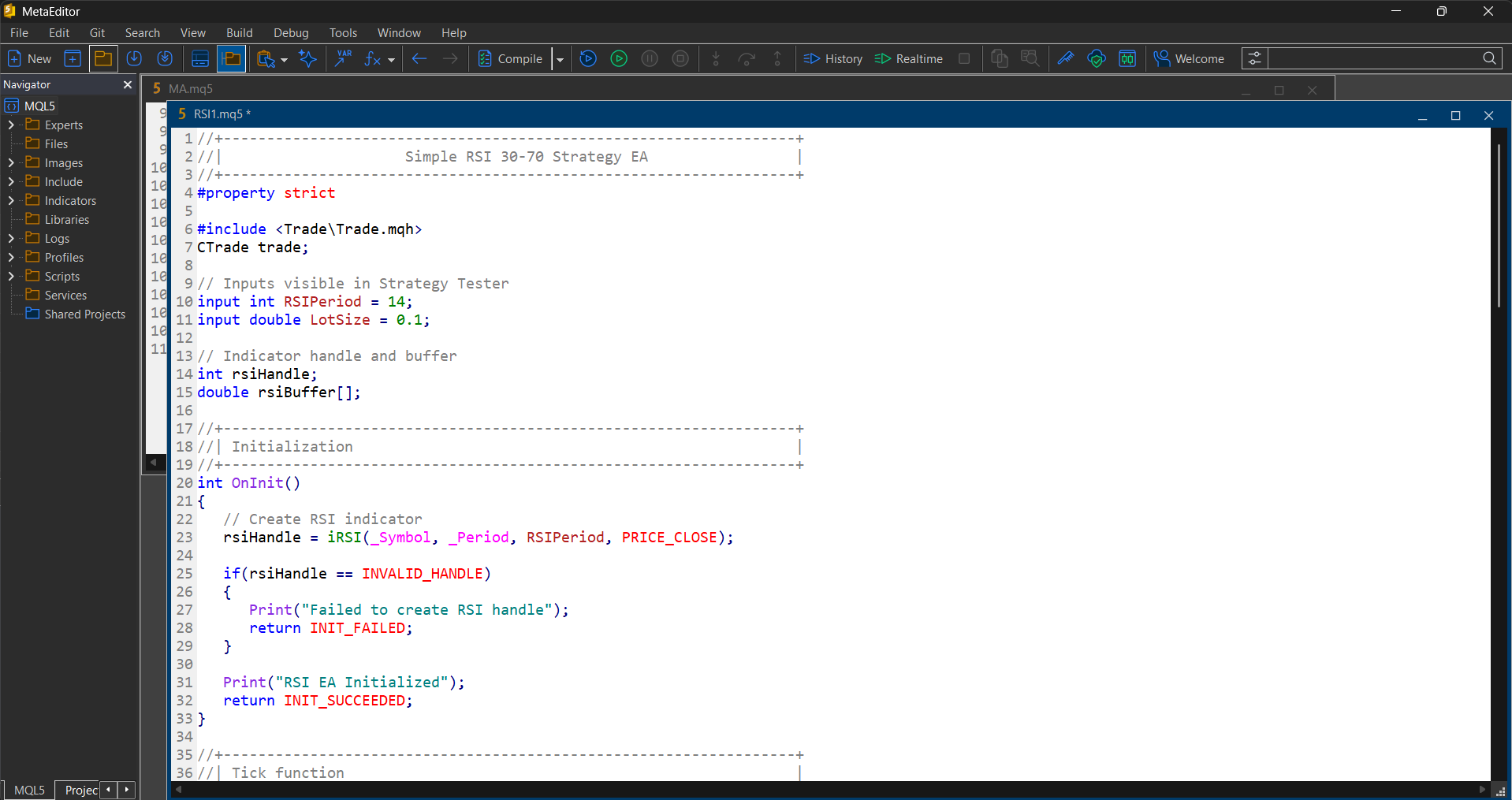
The following shows MetaEditor with the code inside.
1. The indicator
rsiHandle = iRSI(_Symbol, _Period, RSIPeriod, PRICE_CLOSE);You tell MT5:
Symbol (EURUSD, GBPUSD, etc.)
Timeframe
RSI period
Price source
You then pull values from it every tick.
2. Detecting RSI crosses
RSI crossing 30 upward is treated as a buy signal:
bool buy_signal = (rsi_prev < 30 && rsi_now > 30);RSI crossing 70 downward is treated as a sell signal:
bool sell_signal = (rsi_prev > 70 && rsi_now < 70);This avoids false triggers and catches only real crossovers.
3. Trade execution logic
If no trades are open:
if(buy_signal) trade.Buy(LotSize);
if(sell_signal) trade.Sell(LotSize);
If a position is already open, and the opposite signal appears:
The EA closes the current position
Immediately opens a new one in the opposite direction
This creates “always in the market” behavior.
To compile the code, you can follow these steps:
Open MetaEditor (press F4 in MT5).
Paste the EA code into a new Expert Advisor file.
Click Compile.
Make sure there are no errors.
Once compiled, MT5 will automatically place it under: Navigator → Expert Advisors
In MetaTrader 5:
Press Ctrl+R
orGo to View → Strategy Tester
A panel appears at the bottom of MT5.
In the Strategy Tester panel:
Choose Expert: Simple MA Crossover Backtest EA
Choose the symbol (example: EURUSD)
Choose the timeframe (example: H1)
You should see the input parameters (FastMA, SlowMA, LotSize) appear.
Click Start.
MT5 will simulate trades based on your EA logic.
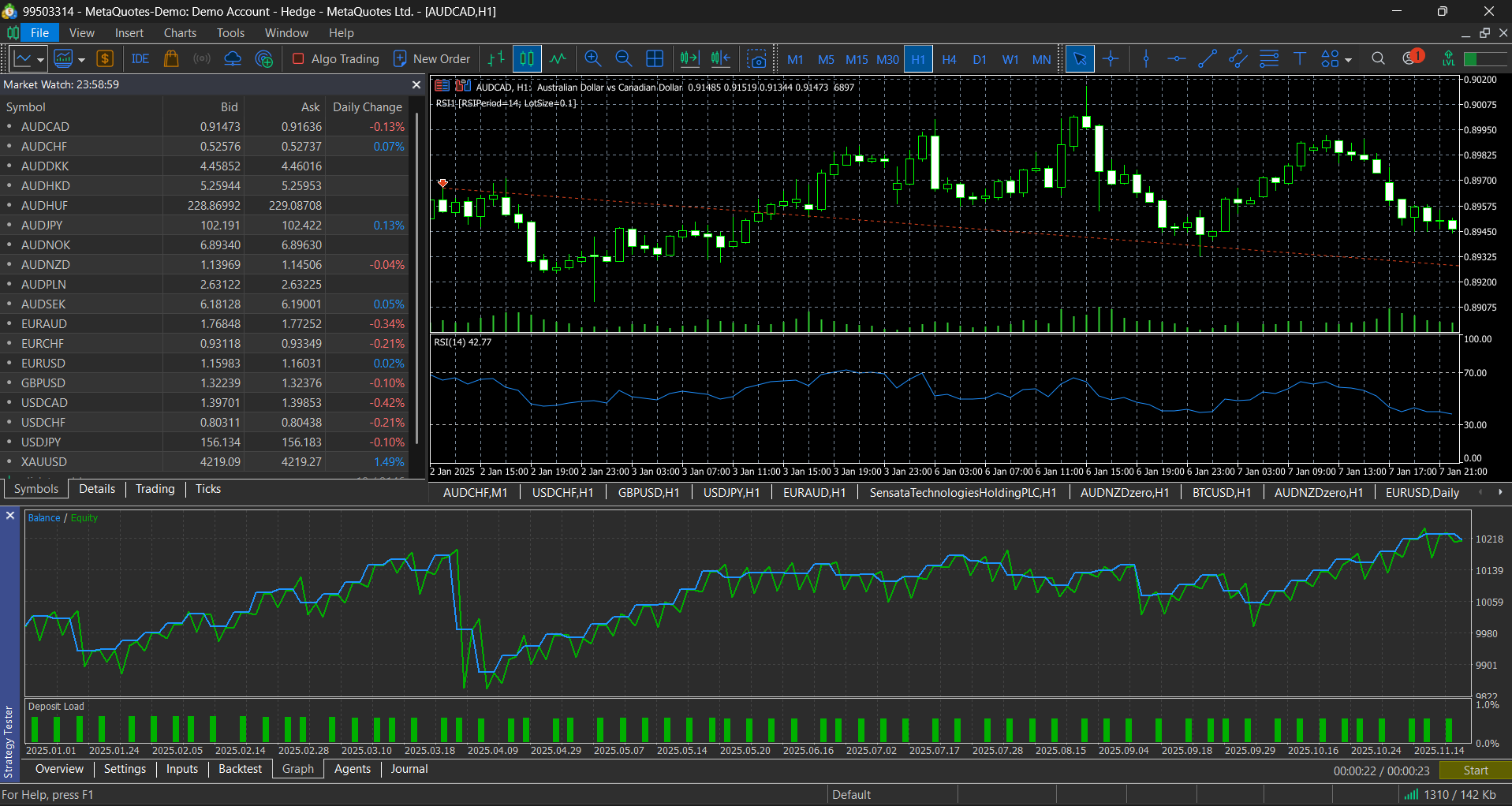
If you enable Visualization, you can watch trades open and close on the chart live during the backtest.
It is slower but very useful for understanding behavior.
Master Deep Learning techniques tailored for time series and market analysis🔥
My book breaks it all down from basic machine learning to complex multi-period LSTM forecasting while going through concepts such as fractional differentiation and forecasting thresholds. Get your copy here 📖!